hdrpano, Technische Fotografie, Hardware und Software Entwicklung, © Kilian Eisenegger 2026 info@hdrpano.ch, 4800 Zofingen, Switzerland, HTML 5 optimiert
XML Papywizard Creator
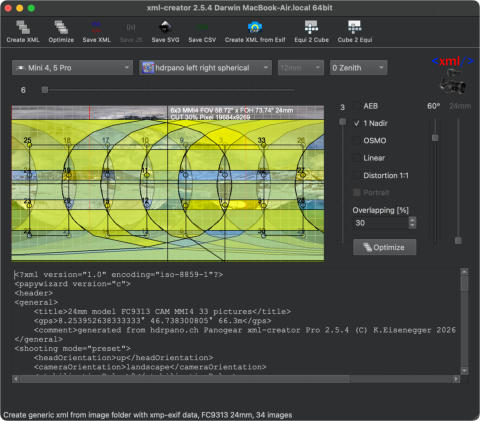
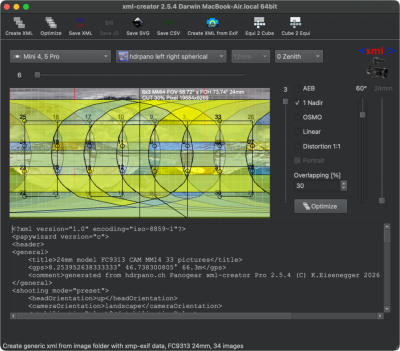
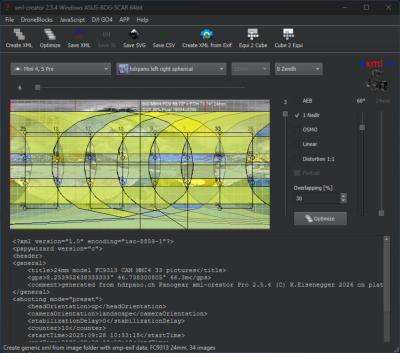
For my panoramas, I use an XML generator that calculates an optimal image overlap angle for drone panoramas. The gener- ated XML grid can be loaded into Autopano Giga, PTGui, and Hugin, and helps these applications achieve significantly better stitching results—especially in challenging areas such as water and blue sky with low texture. With this workflow, it is possible to create full 360° × 180° panoramas using drones. To complete the zenith area, it is necessary to capture an additional 2–5 zenith images from the ground after landing. The current version also includes an option to reduce lens distortion errors (see video below). The XML Creator can be downloaded from this page and is available for both Windows and macOS. It simulates the specific drone camera and the panorama software you intend to use. Currently supported drones and cameras include: Phantom 3 Pro, Phantom 4 Pro, Mavic Pro, Mavic 2 Pro, Mavic 2 Zoom, Mavic Mini, Spark, Inspire 1 and 2 (12 mm – 45 mm lenses), Mavic 3, Mavic 3 Enterprise, DJI Mini 3 Pro, DJI Mini 4 Pro, Air 2 / Air 3S, Mavic 4 Pro, and Mini 5 Pro. The current version reads XMP/EXIF metadata directly from the original JPG image files and automatically generates the corres- ponding XML file. This works with any shooting grid—simply select the folder containing the panorama images. Only original DJI files should be used, as the XMP/EXIF header may be removed by Adobe or other third-party applications. The drone model is detected automatically. DJI DNG files are supported. Please note that image files must first be fully synchronized from the cloud. If you would like to support my work, you can do so with a small donation. The following video explains the workflow in detail.
V2.6.0 DNG Windows X
V2.6.0 DNG MAC OS Silicon
V2.6.0 DNG MAC OS x86


❤️ Support the Project
The xml-creator is available free of charge.
If you find the tool useful, you can voluntarily support its further development.

hdrpano, © Kilian Eisenegger 2026, info@hdrpano.ch, 4800 Zofingen Switzerland
XML Papywizard Creator
For my panoramas, I use an XML generator that calculates an optimal image overlap angle for drone panoramas. The gener- ated XML grid can be loaded into Autopano Giga, PTGui, and Hugin, and helps these applications achieve significantly bet- ter stitching results—especially in challenging areas such as water and blue sky with low texture. With this workflow, it is possible to create full 360° × 180° panoramas using drones. To complete the zenith area, it is necessary to capture an additional 2–5 zenith images from the ground after landing. The current version also includes an option to reduce lens distortion errors (see video below). The XML Creator can be downloaded from this page and is available for both Windows and macOS. It simulates the spe- cific drone camera and the panorama software you intend to use. Currently supported drones and cameras include: Phantom 3 Pro, Phantom 4 Pro, Mavic Pro, Mavic 2 Pro, Mavic 2 Zoom, Mavic Mini, Spark, Inspire 1 and 2 (12 mm – 45 mm lenses), Mavic 3, Mavic 3 Enterprise, DJI Mini 3 Pro, DJI Mini 4 Pro, Air 2 / Air 3S, Mavic 4 Pro, and Mini 5 Pro. The current version reads XMP/EXIF metadata directly from the original JPG image files and automatically generates the corresponding XML file. This works with any shooting grid—simply select the folder containing the panorama images. Only original DJI files should be used, as the XMP/EXIF header may be removed by Adobe or other third-party applic- ations. The drone model is detected automatically. DJI DNG files are supported. Please note that image files must first be fully synchronized from the cloud. If you would like to support my work, you can do so with a small donation. The following video explains the workflow in detail.Lens Distortion reduction
To reduce lens distortion I have developed a special stitching technique. The image acquisition is divided into squares. The XML-Creator supports this technique. It can be used under distortion 1:1. The following video shows how it works. Mavic Pro Tutorial